Every formula you know, and the new ones too
SheetsBat calculates 536 functions, from SUM and VLOOKUP to XLOOKUP, FILTER, LET and LAMBDA. Results spill into neighbouring cells, tables have structured references, and workbooks stay compatible with .xlsx files.
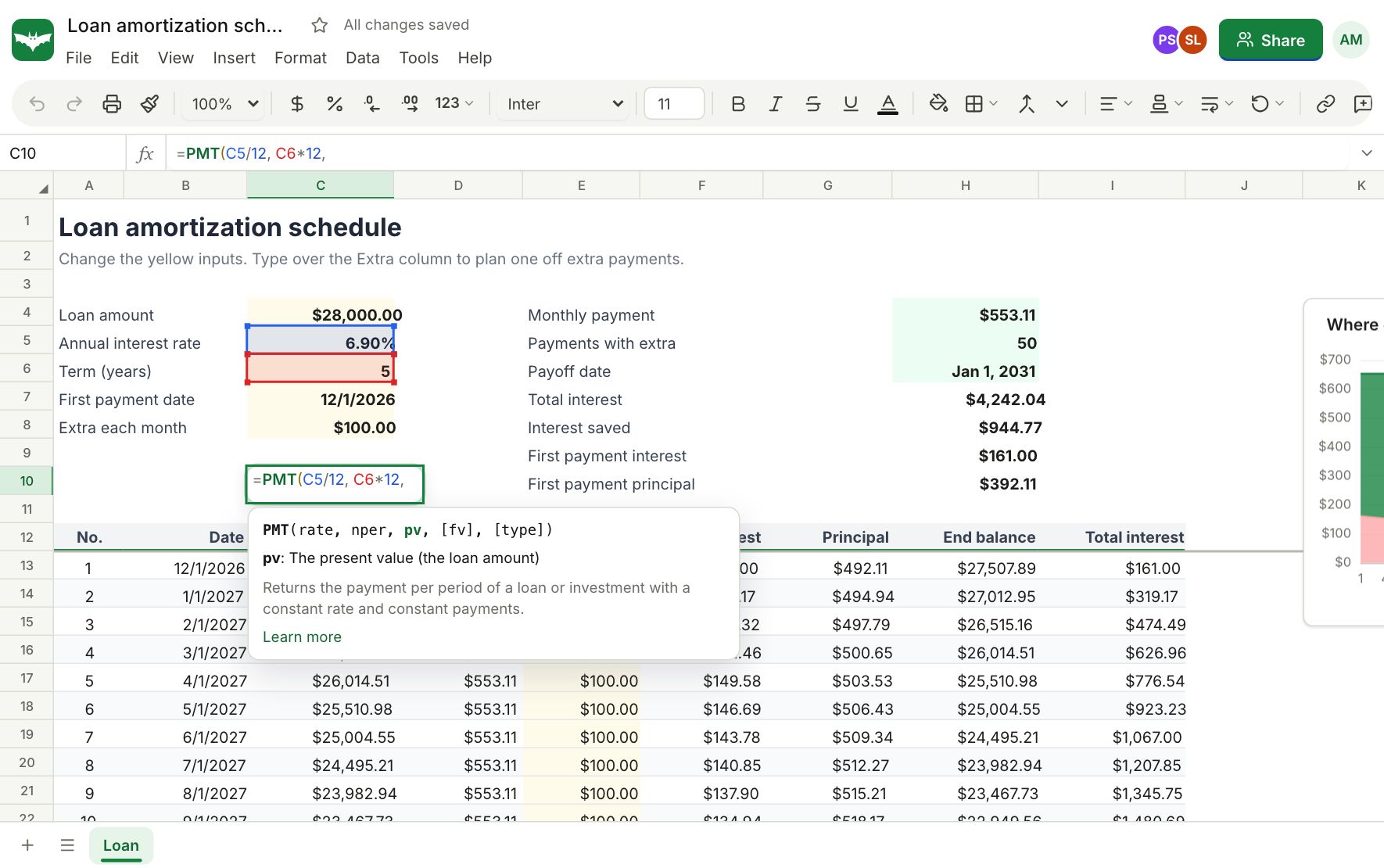
Familiar names and arguments
Functions keep the names, argument order and error values that spreadsheet users already expect, so a formula you type from memory works the first time. Autocomplete shows the signature and a short description as you type, and every function has a reference page with worked examples.
- Math, statistics, text, dates, lookups, finance, engineering and database functions
- Error values like #N/A, #DIV/0! and #SPILL! behave the way you expect
- Compatibility names such as STDEV and PERCENTILE still work in older workbooks
Dynamic arrays that spill
Formulas that return several values fill the cells next to them automatically. Sort a list with SORT, keep matching rows with FILTER, remove duplicates with UNIQUE or stack ranges with VSTACK, and the result grows and shrinks with your data.
- FILTER, SORT, SORTBY, UNIQUE, SEQUENCE, TAKE, DROP, CHOOSECOLS
- TEXTSPLIT, VSTACK, HSTACK, TOCOL, WRAPROWS
- GROUPBY and PIVOTBY for summaries in a single formula
LET and LAMBDA for formulas you can read
Name parts of a long calculation with LET so it reads like a sentence, and wrap logic in LAMBDA to reuse it. MAP, REDUCE, SCAN, BYROW, BYCOL and MAKEARRAY apply a LAMBDA across ranges without helper columns.
- Save a LAMBDA as a named function and call it anywhere in the workbook
- Iterative calculation for models that refer back to themselves
- Volatile functions like TODAY and RAND recalculate on every change
Tables, names and references
Format a range as a table and refer to its columns by name, like Sales[Revenue]. Named ranges and absolute references keep large models readable, and Show formulas reveals every formula in the sheet at once.
Questions about formulas
How many functions does SheetsBat support?
536 functions across math, statistics, text, dates, lookups, finance, engineering, information, database, web and array categories. The full list is on the functions reference page.
Does SheetsBat support XLOOKUP and dynamic arrays?
Yes. XLOOKUP, XMATCH, FILTER, SORT, UNIQUE, SEQUENCE and the other array functions return results that spill into neighbouring cells.
Can I use LAMBDA and LET?
Yes. LET names values inside a formula, LAMBDA defines reusable logic, and MAP, REDUCE, SCAN, BYROW, BYCOL and MAKEARRAY apply a LAMBDA to ranges.
Will my formulas still work when I download the file as .xlsx?
Yes. Formulas are saved as formulas in the .xlsx file, together with their last calculated values, so desktop spreadsheet apps open them as you left them.
Can AI help me write a formula?
Yes. Describe what you want in plain words and SheetsBat AI writes the formula for the active cell, or explains an existing formula step by step. It uses AI credits.
Keep exploring
- SheetsBat AIDescribe what you need and SheetsBat AI writes the formula, explains it step by step, builds a table, analyzes your data or cleans messy columns. Credits included.
- Pivot tablesDrag fields into rows, columns and values to summarize data by region, month or product. Sum, count, average, percent of total and date grouping.
- Open Excel filesOpen .xlsx, .csv and .ods files in your browser, edit them with formulas, charts and formatting, then download them again as .xlsx, CSV or PDF.
See it for yourself
Open a blank sheet or a template. No account needed to try it.