Ask for the formula. Get the formula.
SheetsBat AI writes formulas from a plain description, explains formulas you did not write, builds new tables, summarizes data and tidies messy columns. It reads only the context it needs and every change is one undo away.
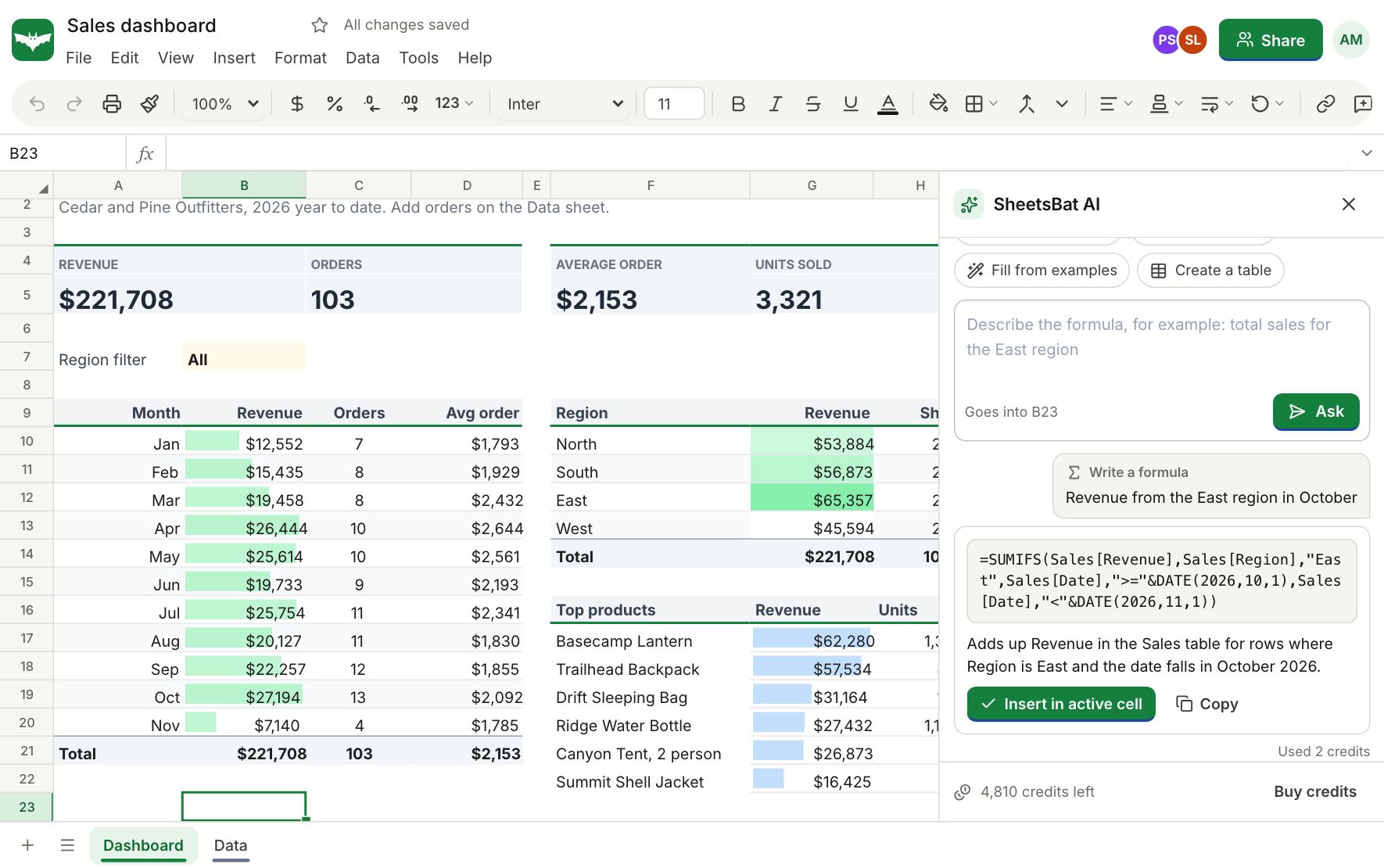
Write a formula from a sentence
Select a cell and type what you want, like "total revenue for the North region in March". SheetsBat AI looks at your headers and a sample of rows and returns one formula with a short note on how it works. You see it before it goes in the cell.
- Uses the functions SheetsBat calculates, so the formula works
- Refers to your real ranges, tables and names
- Undo removes it in one step
Explain any formula
Open a workbook someone else built and point at a long formula. You get a one sentence summary, the steps in order, and what each part of the formula means, in plain language.
Build, analyze and clean
Ask for a starter table or a full template and SheetsBat AI lays out the sheet with headers, sample rows, number formats and a chart. It can also read your data and point out trends and outliers, suggest fixes for inconsistent text, dates and spacing, or fill a column by learning from a few examples you type.
- Generate a table or a template from a description
- Analyze a range and answer a question about it
- Clean up names, dates, casing and stray spaces
- Fill by example: type two or three results and let it finish the column
Credits from your OfficeBats wallet
AI actions use credits from the one wallet that every Bats app shares. Free accounts get 300 credits a month, Pro gets 5,000 and Business gets 20,000. Most formula requests cost a few credits, and you can buy more on OfficeBats at any time. Purchased credits never expire.
Questions about SheetsBat AI
Is SheetsBat AI free?
Every account gets monthly AI credits: 300 on Free, 5,000 on Pro and 20,000 on Business. Credits are shared by every Bats app and you can buy more when you need them.
Does the AI see my whole workbook?
No. It receives the context for the task: the sheet name, headers, a small sample of rows and the selection. It does not get your account details.
Is my data used to train AI models?
SheetsBat does not use your workbooks to train AI models. Only the context a task needs is sent, and only when you ask for an AI action.
What if the formula is not what I wanted?
You see the formula and its explanation before it goes in. If you insert it and change your mind, Undo removes it in one step.
Can it explain formulas I did not write?
Yes. Select the cell and choose Explain. You get a summary, the steps in order and the meaning of each part of the formula.
Keep exploring
- FormulasWrite formulas the way you already know: XLOOKUP, FILTER, SUMIFS, LET, LAMBDA and 536 functions in all, with spilling arrays, tables and named ranges.
- TemplatesStart from a ready made budget, invoice, loan schedule, Gantt chart, dashboard or tracker. Every template is free, with working formulas and charts.
- OfficeBats DriveKeep spreadsheets, documents and PDFs in one OfficeBats Drive shared by every Bats app. Open files from it in SheetsBat and save copies back with one click.
See it for yourself
Open a blank sheet or a template. No account needed to try it.